HeadSet2.1
Publisher Description
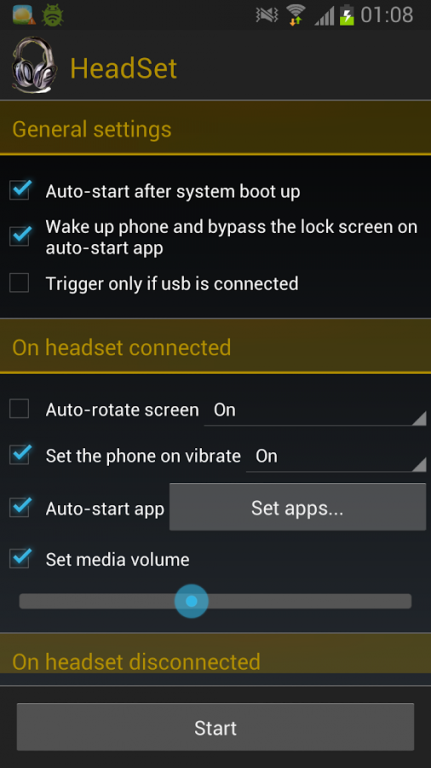
This application was done because I couldn't find something in the market to suit my needs.
Plug in customizer and launcher for the Headset/Headphones
Features:
Now you can select multiple apps to launch and when the heaset is connected a dialog will popup to select one. If only one is selected the app will function as before and launch the app directly.
- Auto-start after system boot up
- Wake up phone and bypass the lock screen on auto-start app
- Trigger only if usb is connected (charging)
- Enable/disable auto-rotate screen on headset connected/disconnected
- Auto-start app on headset connected
- Set media volume on headset connected
- Set the phone on/off on vibrage mode
- Feedback menu button
** This application is an open source license GNU GPLv3 and it can be found in GitHub - https://github.com/heepie/HeadSet
** For any problems, bugs, feature request and anything else please email me at codeskraps@gmail.com
About HeadSet
The company that develops HeadSet is Codeskraps. The latest version released by its developer is 2.1. This app was rated by 1 users of our site and has an average rating of 5.0.
To install HeadSet on your Android device, just click the green Continue To App button above to start the installation process. The app is listed on our website since 2014-04-01 and was downloaded 17 times. We have already checked if the download link is safe, however for your own protection we recommend that you scan the downloaded app with your antivirus. Your antivirus may detect the HeadSet as malware as malware if the download link to com.codeskraps.headset is broken.
How to install HeadSet on your Android device:
- Click on the Continue To App button on our website. This will redirect you to Google Play.
- Once the HeadSet is shown in the Google Play listing of your Android device, you can start its download and installation. Tap on the Install button located below the search bar and to the right of the app icon.
- A pop-up window with the permissions required by HeadSet will be shown. Click on Accept to continue the process.
- HeadSet will be downloaded onto your device, displaying a progress. Once the download completes, the installation will start and you'll get a notification after the installation is finished.
Program Details
System requirements
Download information
Pricing
Version History
version 2.1
posted on 2014-04-01
**** Load of changes on this version ****,** I've updated the theme for newer devices.,** The biggest change is the option to select multiple apps to launch when headset is connected, and a dialog will popup for you to select one. If only one app is selected HeadSet will function as before.,** New option to trigger only if the usb is connected (charging),v2.1 -Bug fixes,v2 -Theme updates,- App multiselect,- Trigger only if usb connected,v1.15 -Stop HeadSet from launching multiple times
version 1.15
posted on 2013-06-04
Several fixes and updates
